Parts
eufy RoboVac Battery Replacement
Which pack belongs in your RoboVac, what eufy says it fits, and the swap in a handful of steps.
As an Amazon Associate we earn from qualifying purchases, at no cost to you. How we make money.
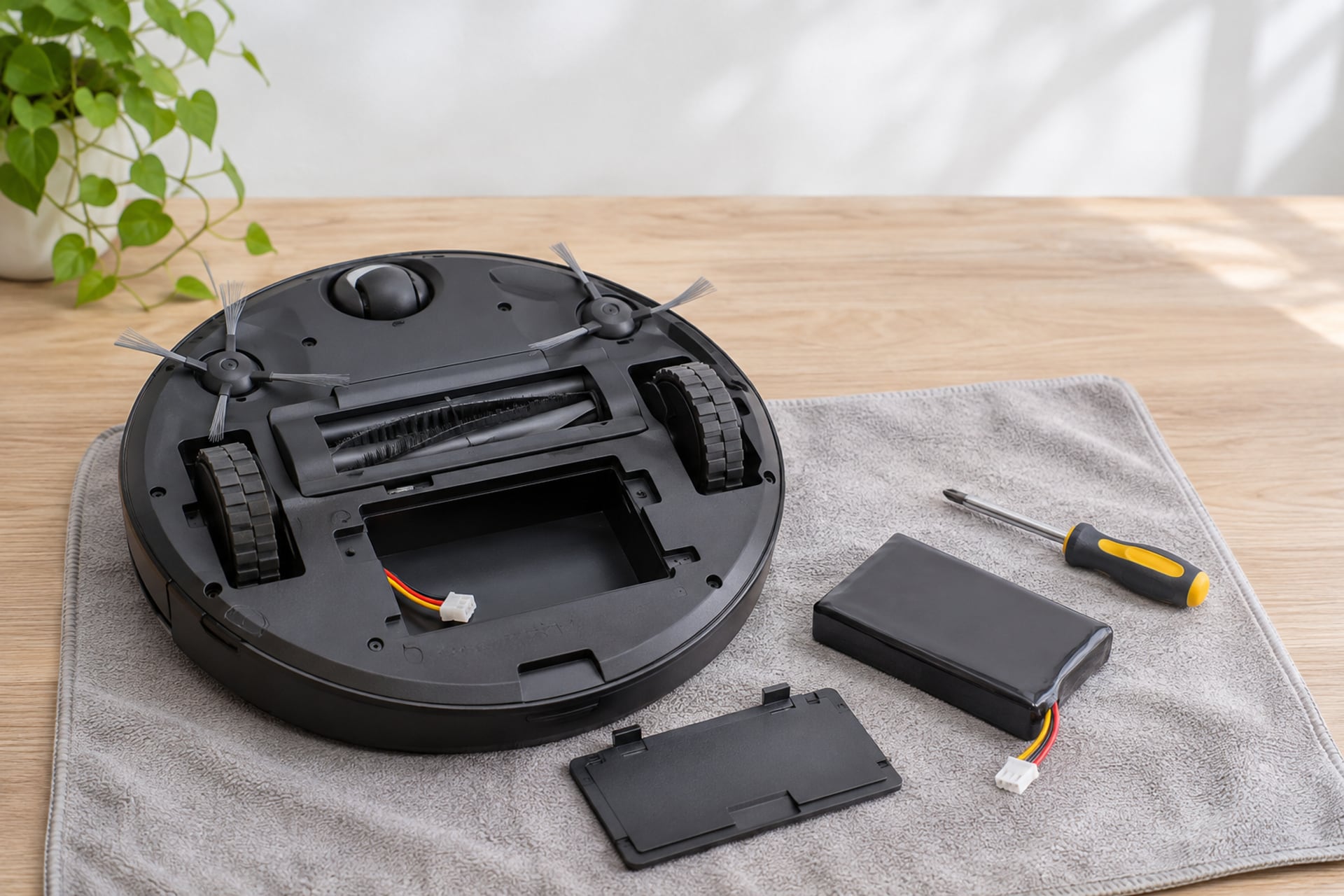
A RoboVac that returns to the dock early, stops mid-room or needs a full night on the charger for a short run is usually telling you the pack is tired. The good news is that eufy sells its own replacement pack, one pack covers a long list of RoboVac models, and the swap takes a screwdriver and a few minutes.
This page shows which RoboVac models eufy and the pack listing name, the signs that point at the battery, and the steps for the change. It is a parts guide, not a ranking. If your robot is not charging at all, rule out the dock and the contacts first, because those look a lot like a dead battery and cost nothing to check. If you are weighing a repair against a new robot, our eufy robot vacuum reviews cover the current line. Own a Roomba instead? See our Roomba battery replacement guide.
Signs the Battery Is Worn
A battery rarely fails in one go. It fades, and the robot shows it in ordinary ways long before it stops. None of the signs below proves the battery is the cause on its own, but several together make it the likeliest one.
Shorter Runs and Early Returns
The classic pattern is a RoboVac that used to finish the floor on one charge and now heads home early, or stops short of the dock. Runs get shorter month by month, and the robot may sit on the charger for hours and still not behave as it once did.
Charging That Never Seems to Finish
If the robot charges overnight and the run is still short, the pack is not holding what it takes in. A pack that is simply flat after long storage may need a long first charge, so give it one before you condemn it.
What to Rule Out First
iFixit's troubleshooting page for the RoboVac 11S lists the cheap causes: a base that is not firmly plugged into a working outlet, a base that is not on a flat and clear surface, a damaged charging cable, and dust or grime on the metal contacts of the robot and the base. If you have wiped the contacts, tried another outlet and the robot still runs short, a new pack is the sensible purchase.
How We Match the Pack
We do not run a test lab and we do not claim to have tested this pack. Every fit statement here is copied from eufy's own product page or from the Amazon listing, and the swap steps come from eufy's listing and from iFixit's repair guide. Where a source does not say something, this page says "not stated".
-
Models named
The RoboVac models the pack listing says it fits.
-
Where sources differ
eufy's page and the Amazon title do not list exactly the same models, and we say so.
-
Genuine only
We link only the pack sold under the eufy name, never an unnamed aftermarket pack.
-
Claims by source
Warranty terms are credited to the listing that states them.
Sources read on November 20, 2026. No brand paid to be on this page or saw it before publication. When you buy through our links we may earn a commission from Amazon; it never changes the order.
Which Battery Fits Your RoboVac
Find your model first. It is printed on the underside of the robot and on the box, and it is in the manual. The table below pairs each family with what the pack sources say. "Not stated" means the source does not name that model, so do not assume it fits.
The Slim RoboVac Line: 11, 11S, 12, 15C and 30C
These are the compact, low-profile robots most owners search for. The Amazon listing for eufy's pack names the RoboVac 11, 11S, 11S Plus, 11S MAX, 12, 15C and 15C MAX. eufy's own product page for the pack goes further and lists the 30, 30C and 30C MAX as well, along with the 15T, 25C, 25C Max and 35C. So the 30C is covered by eufy's page, even though the Amazon title does not spell it out.
The G Series
The Amazon listing names the G10 Hybrid, G20, G30, G35 and G40. eufy's page adds more G variants, including the G15, G30 Edge, G30 Hybrid, G30 Verge, G32 Pro, G40 Hybrid and the G40 Plus models. If your G Series model is not on either list, check eufy's page for your exact name before you buy.
Models That Are Not Named
If your eufy robot is not on either list, do not assume this pack fits it. Check the manual or eufy's support site for your model.
| RoboVac family | RoboVac 11, 11S, 12 | RoboVac 15C and 30C | G Series |
|---|---|---|---|
| eufy pack we link | Replacement Battery Pack | Replacement Battery Pack | Replacement Battery Pack |
| Models the Amazon listing names | 11, 11S, 11S Plus, 11S MAX, 12 | 15C, 15C MAX; 30C not named | G10 Hybrid, G20, G30, G35, G35+, G40 |
| Models eufy's own page names | 11, 11C, 11S, 11S Plus, 11S MAX, 12 | 15C, 15C MAX, 30, 30C, 30C MAX | G10 Hybrid, G15, G20, G30 variants, G32 Pro, G35, G40 variants |
| Capacity and voltage | Not stated | Not stated | Not stated |
| Warranty stated | 1 year | 1 year | 1 year |
RoboVac 11, 11S, 12
Show specifications
- eufy pack we link
- Replacement Battery Pack
- Models the Amazon listing names
- 11, 11S, 11S Plus, 11S MAX, 12
- Models eufy's own page names
- 11, 11C, 11S, 11S Plus, 11S MAX, 12
- Capacity and voltage
- Not stated
- Warranty stated
- 1 year
RoboVac 15C and 30C
Show specifications
- eufy pack we link
- Replacement Battery Pack
- Models the Amazon listing names
- 15C, 15C MAX; 30C not named
- Models eufy's own page names
- 15C, 15C MAX, 30, 30C, 30C MAX
- Capacity and voltage
- Not stated
- Warranty stated
- 1 year
G Series
Show specifications
- eufy pack we link
- Replacement Battery Pack
- Models the Amazon listing names
- G10 Hybrid, G20, G30, G35, G35+, G40
- Models eufy's own page names
- G10 Hybrid, G15, G20, G30 variants, G32 Pro, G35, G40 variants
- Capacity and voltage
- Not stated
- Warranty stated
- 1 year
The Pack We Link
One pack, sold under eufy's own name, because both the Amazon listing and eufy's page state the fit and the warranty. We do not link aftermarket packs under unfamiliar names. The live price sits beside the button, because battery prices move.

Top pick · Best for keeping a RoboVac running
eufy RoboVac Replacement Battery Pack
The straightforward pick for a RoboVac that no longer holds a charge: a pack sold under the eufy name, with a long, stated fit list and a 1 year warranty.
- Budget
- Buy it if
- You own one of the RoboVac or G Series models named above and want the pack the maker itself sells.
- Skip it if
- Your model is not named by either source, or the old pack is fine and the real problem is a dirty contact or a dead outlet.
The Amazon listing is titled as a eufy replacement battery pack compatible with the RoboVac 11, 11S MAX, 15C MAX, 15C, G40 Series, G30 Series, G10 Hybrid, G20 and G35, and its feature text adds the 11S, 11S Plus and 12. It names eufy as both brand and manufacturer, and states a 1 year warranty. The seller on the listing we read is Anker EufyHome, and the item is shown as new with a stated later availability date, so check the date on the page before you order.
The listing describes the cells as high-quality and says the pack protects against short circuiting, overcharging, over-discharging and overheating. That is the seller's own claim. It does not state a capacity in mAh or a voltage, so we do not quote either. The listed item weight is about 0.44 pounds and the listed size is roughly 2.9 by 1.6 by 1.6 inches.
What stands out
- Sold under the eufy name, with a long fit list
- 1 year warranty stated in the listing
- Install is a short job, per the listing
Trade-offs
- Capacity and voltage not stated
- The Amazon title does not name the 30C, though eufy's page does
- Availability date may be later than today
How to Replace a eufy RoboVac Battery
The listing says to remove the battery cover, unlatch the old battery and insert the new one with the sticker side up, with the wires tucked neatly into the compartment. iFixit's guide for the RoboVac 11S shows the same job with the access detail: it is rated easy, takes 5 to 20 minutes and needs a Phillips #1 screwdriver. We did not find eufy step-by-step pages for the G Series, so for those, open your manual before you start.
RoboVac 11S style bottom cover swap
-
Switch the robot off
Turn the robot over onto a soft surface, switch the power off, then lay it flat with the underside up.
-
Remove the bottom cover
iFixit's guide shows two 5 mm screws holding the bottom cover on the 11S. Remove them with the Phillips screwdriver, keep them in a dish and lift the cover off.
-
Unplug and remove the old pack
Carefully detach the connector, unlatch the old battery and lift it out. iFixit says to dispose of the old pack properly, so take it to a battery recycling point rather than the household bin.
-
Fit the new pack sticker side up
Seat the new pack with the sticker facing up, connect it, and tuck the wires neatly inside the compartment so they are not pinched by the cover.
-
Close up and charge
Refit the cover and screws, then put the robot on its base and let it charge fully before the first run.
Charging Problems That Aren't the Battery
Before you spend on a pack, spend ten minutes on the cheap causes. They are the most common reason a RoboVac seems dead.
The Contacts
iFixit's troubleshooting page says dust or grime on the metal contacts on both the robot and the base can stop charging. Wipe both sets gently with a clean, dry cloth.
The Base and the Outlet
Confirm the base is firmly plugged into a working outlet, which you can test with another device, and that it sits on a flat, unobstructed surface so the robot can dock. Check the charging cable for damage or fraying and replace it if it is worn.
A Reset
The same page says that turning the robot off and on, and if that fails, holding the power button for about 10 seconds until you hear a beep, can reset it. If a long charge, clean contacts and a good outlet change nothing, the pack is the likely culprit.
Making the New Battery Last
The sources give no battery life in years, so this section sticks to the upkeep iFixit lists for runtime and keeps its limits in view.
Keep the Robot Light on Its Feet
iFixit says clogs make the robot work harder, so keep the dustbin, brush roll and filter clean, and clear obstacles from its path, because frequent bumping and re-routing drains the battery faster. Our robot vacuum parts page covers the filters and brushes that wear out alongside the battery.
Use the Right Mode and Schedule
The same page suggests using an energy-efficient cleaning mode instead of high power all the time and adjusting the schedule so the robot runs less often. We do not have a figure for how much that saves, so we will not give one.
Know When the Robot Is the Better Spend
A pack only makes sense in a robot you still like. If the brushes, filters and bin are worn too and you were already thinking about a newer model, read our guide on how long robot vacuums last. To find other parts for your exact model, try the parts finder.
eufy RoboVac Battery Replacement FAQ
Product prices and availability are accurate as of the date/time indicated and are subject to change. Any price and availability information displayed on Amazon.com at the time of purchase will apply to the purchase of this product. Prices on this page are read again from Amazon once a reading is an hour old, and a price is hidden when the latest reading is more than 24 hours old. CERTAIN CONTENT THAT APPEARS ON THIS SITE COMES FROM AMAZON. THIS CONTENT IS PROVIDED 'AS IS' AND IS SUBJECT TO CHANGE OR REMOVAL AT ANY TIME.
Sources
- eufy, eufy RoboVac Replacement Battery Pack, eufy.com, read on November 20, 2026 Source for the compatible model list including the 30C, the installation steps, the 1 year warranty and the fact that voltage and capacity are not stated.
- iFixit, Eufy RoboVac 11S Battery Replacement, ifixit.com, read on November 20, 2026 Source for the difficulty rating, the time estimate, the Phillips #1 screwdriver, the two bottom cover screws and the disposal advice.
- iFixit, eufy RoboVac 11s troubleshooting, ifixit.com, read on November 20, 2026 Source for the charging checks, the contacts, the 10 second reset and the runtime upkeep advice.
- Amazon US product listing for the eufy Accessories Replacement Battery Pack, read through the Amazon Creators API on November 20, 2026 Source for the named models in the title and features, the install text, the 1 year warranty, the seller, the item size and weight and the safety claim.