Parts guide
Roborock Dust Bags, Dock by Dock
Roborock sells two kinds of disposable dust bag, and which one your dock takes depends on the model. Here is how to tell them apart, how often Roborock says to change them, and what its pages say about reusing one.
As an Amazon Associate we earn from qualifying purchases, at no cost to you. How we make money.
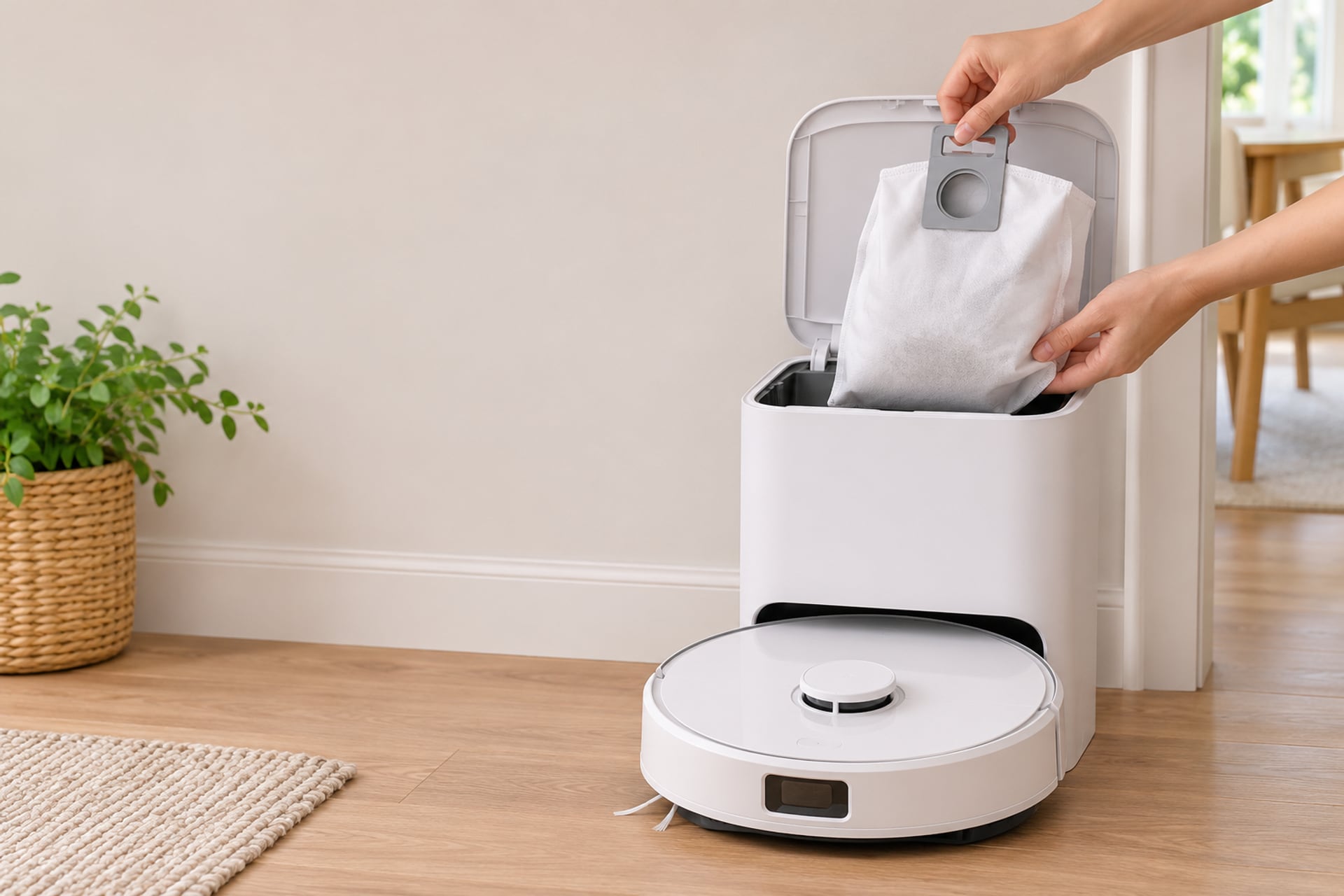
A Roborock with a self-emptying dock does not throw the dirt away. It moves it from the robot's small bin into a paper bag inside the dock, and that bag is the part you will buy again and again. Buy the wrong one and it either does not seat in the dock or does not seal against it, so it pays to check before you order.
There is a second reason to get this right. Roborock's own support pages say the dock should not run without a bag, because emptying with no bag can damage the fan. This guide covers which bag goes with which dock, how often Roborock says to change it, how to swap one, and what the maker says about emptying and reusing a bag.
We work from Roborock's product titles, its support articles and the Amazon listings for the two bags, all read on November 19, 2026, and the sources are listed at the end. Where those pages are silent, we say so instead of guessing. For the other consumables, see our Roborock replacement parts guide.
Find Your Dock First
The bag fits the dock, not the robot alone, so start with the name of your robot and the dock it lives on. A mismatch between the two is the most common way to end up with a bag that does not fit.
Read the Model Name
The model name is on the underside of the robot and in the Roborock app under the device details. Read it to the last character, because Q7 Max+, Q7 M5+ and Q7+ are different entries in the compatibility lists, and so are S8 Max Ultra and S8 MaxV Ultra.
The Dock Names Roborock Uses
Roborock's support articles refer to several docks by name: the Auto-Empty Dock Pure, the RockDock Plus, the RockDock Ultra, the Empty Wash Fill Dock and the Multifunctional Dock. One article says the original Auto-Empty Dock is compatible only with the S7, and not with models earlier than the S7. Another says the Empty Wash Fill Dock goes with the S7 MaxV Ultra, the S7 Max Ultra and the Q Revo. For the newer docks, the support articles for the Saros 10, Saros 10R and Qrevo Curv describe a Multifunctional Dock with auto-emptying of the onboard dustbin.
What We Could Not Confirm
Roborock's support pages do not give one table that maps every robot to a dock name and a bag number. So we build the map below from the model lists in the two Roborock bag listings, which both carry the model names in their titles. A robot that is not named in either list is unconfirmed: ask Roborock with your model name before you order.
Which Bag Fits Which Dock
Roborock sells two bag types, and its two listings name different robots. One lists the Saros, Qrevo and Qrevo Edge families and the S8 MaxV Ultra and S8 Max Ultra. The other lists the S8 Pro Ultra, S8+, S7 Max Ultra, S7 MaxV Ultra and the Q Series Plus models. The first holds 2.7 L per bag and the second 2.5 L, going by the listings. The table below shows which listing names which robot.
| Your robot | Saros, Qrevo and S8 Max bag | S7, S8+ and Q Series Plus bag |
|---|---|---|
| Bag |  |  |
| Saros 10 and Saros 10R | ✅ Listed | Not named |
| Qrevo S Pro and Qrevo 2 Pro | ✅ Listed | Not named |
| Q Revo and Qrevo MaxV | ✅ Listed | Not named |
| Qrevo Slim and Qrevo Curv | ✅ Listed | Not named |
| S8 MaxV Ultra and S8 Max Ultra | ✅ Listed | Not named |
| S8 Pro Ultra and S8+ | Not named | ✅ Listed |
| S7 MaxV Ultra and S7 Max Ultra | Not named | ✅ Listed |
| Q7 Max+ and Q8 Max+ | Not named | ✅ Listed |
| Q5+, Q5 Pro+ and Q5 Max+ | Not named | ✅ Listed |
| Buy | Check price on Amazon | Check price on Amazon |
Saros, Qrevo and S8 Max bag
Show specifications
- Saros 10 and Saros 10R
- ✅ Listed
- Qrevo S Pro and Qrevo 2 Pro
- ✅ Listed
- Q Revo and Qrevo MaxV
- ✅ Listed
- Qrevo Slim and Qrevo Curv
- ✅ Listed
- S8 MaxV Ultra and S8 Max Ultra
- ✅ Listed
- S8 Pro Ultra and S8+
- Not named
- S7 MaxV Ultra and S7 Max Ultra
- Not named
- Q7 Max+ and Q8 Max+
- Not named
- Q5+, Q5 Pro+ and Q5 Max+
- Not named
S7, S8+ and Q Series Plus bag
Show specifications
- Saros 10 and Saros 10R
- Not named
- Qrevo S Pro and Qrevo 2 Pro
- Not named
- Q Revo and Qrevo MaxV
- Not named
- Qrevo Slim and Qrevo Curv
- Not named
- S8 MaxV Ultra and S8 Max Ultra
- Not named
- S8 Pro Ultra and S8+
- ✅ Listed
- S7 MaxV Ultra and S7 Max Ultra
- ✅ Listed
- Q7 Max+ and Q8 Max+
- ✅ Listed
- Q5+, Q5 Pro+ and Q5 Max+
- ✅ Listed
Two details are worth checking. The Roborock store title for the first bag also names the QV series and the Qrevo Curv and Qrevo Edge families, which the table groups under Qrevo. And the store title for the second bag adds the Q10 X5+, Q10 S5+, Q7 M5+, Q7 L5+, Q55 DuoRoller+ and S7 Pro Ultra, which are not all named on the Amazon listing. If your robot is in one of those, use the Roborock store page as the authority, or ask Roborock to confirm.
The Bags
Both bags below are sold by Roborock Technology on Amazon US, the same company that makes the robots. We link only to these two, for the reasons in the next section. The first is for the newer Saros and Qrevo docks, the second for the S7, S8+ and Q Series Plus docks.
Top pick · Best for newer docks
Roborock Disposable Dust Bags (6)
The bag for the newer multifunctional docks. Its listing names the Saros 10 and 10R, the Qrevo S Pro, Qrevo 2 Pro, Q Revo, Qrevo MaxV and Qrevo Slim, plus the S8 MaxV Ultra and S8 Max Ultra.
- Budget
- Saros 10 and Saros 10R Listed
- Qrevo S Pro and Qrevo 2 Pro Listed
- Q Revo and Qrevo MaxV Listed
- Qrevo Slim and Qrevo Curv Listed
- Buy it if
- You own a Saros, a Qrevo or an S8 MaxV or Max Ultra and want the bag Roborock itself lists for that dock, in a pack that covers several changes.
- Skip it if
- Your robot is an S7, an S8 Pro Ultra, an S8+ or a Q Series Plus model. Those sit in the other listing, and the two bags are not described as interchangeable.
The listing states six bags of 2.7 L each in white, sold by Roborock Technology Co. Ltd. It describes a push-pull handle so you can lift the full bag out without touching the dust, and it says to replace the bag every one to two months. It also carries a note that buying Roborock-branded parts is recommended because the maker has received complaints about non-compliant sellers. That is the maker's statement, from a company that sells the part, so weigh it as that.
What stands out
- Listing names the Saros 10 and 10R, the Qrevo family and the S8 MaxV and Max Ultra
- Six bags per pack, each 2.7 L by the listing
- Push-pull handle, per the listing, so you do not touch the dust
- Sold by Roborock itself on Amazon
Trade-offs
- Not listed for the S7, S8 Pro Ultra, S8+ or Q Series Plus docks
- The listing states a one to two month change interval, which is wider than Roborock's support pages
- A robot not named in the list is unconfirmed
Best for the older docks
Roborock Disposable Dust Bags (6)
The bag to buy when your dock belongs to an S7, an S8 Pro Ultra, an S8+ or a Q Series Plus model. The listing names those robots and nothing from the Saros or Qrevo lines.
- Budget
- Saros 10 and Saros 10R Not named
- Qrevo S Pro and Qrevo 2 Pro Not named
- Q Revo and Qrevo MaxV Not named
- Qrevo Slim and Qrevo Curv Not named
- Buy it if
- You own an S7 MaxV Ultra, S7 Max Ultra, S8 Pro Ultra, S8+, Q7 Max+, Q8 Max+, Q5+, Q5 Pro+ or Q5 Max+ and want the Roborock-listed bag.
- Skip it if
- Your robot is a Saros or a Qrevo. Its dock is covered by the other listing, not this one.
The listing states six bags of 2.5 L each, sold by Roborock Technology Co. Ltd, with the same push-pull handle and the same one to two month change advice as the first bag. Its note tells owners to buy replacement parts from the Roborock store. The title adds the Q5 DuoRoller+ and the Q10 S5+, Q10 X5+ and Q7 M5+ to the list.
What stands out
- Listing names the S7 MaxV and Max Ultra, S8 Pro Ultra, S8+ and the Q Series Plus models
- Six bags per pack, each 2.5 L by the listing
- Push-pull handle, per the listing
- Sold by Roborock itself on Amazon
Trade-offs
- Not listed for the Saros or Qrevo docks
- Model list in the title and the feature text do not match line for line, so check your exact name
- The listing does not state a warranty position for third-party bags
OEM vs Compatible Bags
OEM here means the bag Roborock sells itself. A compatible bag is a pack from another company, written to fit the same dock. Many exist, and we are not going to pretend they are all bad. We are going to be honest about what we can and cannot read.
What Roborock Says
Both Roborock listings carry a note pushing owners to buy parts from Roborock. The first says the maker has received complaints about non-compliant sellers, and the second asks owners to buy from the Roborock store. Roborock sells the part, so it has an interest in the answer. We cannot see its complaint records, and the listings do not say whether using another bag affects a warranty.
What a Compatible Pack Has to Get Right
A bag is a simple object, so the checks are short. The collar has to seat in the dock's inlet, the seal has to stop dust leaking back round the opening, and the handle has to fit the slot, because Roborock's support article says the handle must be inserted all the way down or the dock may not empty well. Third-party listings state their own fit lists, and those are the seller's claims, not Roborock's.
Our Position
We link only to Roborock's own bags, because those are the only ones whose fit we can read against Roborock's model names. If you buy a compatible bag from a seller you trust, match your exact model against its list, check that the pack is the right type for your dock, and keep a spare Roborock bag in case the first one does not seal. We have not checked the fit of any third-party bag against a dock and do not say how any of them performs.
How Often to Change a Roborock Dust Bag
Roborock gives more than one answer, and they are close but not identical. A support article updated on November 19, 2026 says that for the Auto-Empty Dock Pure, RockDock Plus, RockDock Ultra and Multifunctional Dock, it suggests replacing the disposable dust bag every 7 weeks, and that it depends on actual use. An older article for the dust bag in general says every 8 weeks, with the same note on use. The Amazon listings for both bags say to replace the bag every one to two months.
Put together, seven to eight weeks is Roborock's own guide, and the listing wording is roughly the same span. Treat it as a ceiling that a busy house will hit sooner: a big home with pets fills a bag faster than a small flat. A full bag is also a common reason for auto-emptying to stop, since Roborock's page on that problem says to replace the dust bag if it is full.
How to Change a Roborock Dust Bag
-
Check the dock's light and cover
Roborock says the dock's dust container cover must be installed for auto-emptying to run, and that the indicator light turns red when the dustbin is removed. You can take the dustbin out while the dock is plugged in, so there is no need to pull the plug.
-
Open the dock's dust container
Open the cover over the bag compartment. The exact latch differs between docks, so use the picture in your manual for the dock name from the first section. We found no Roborock page that shows these steps per model, so we do not describe a latch.
-
Pull the full bag out by its handle
The Amazon listings describe a push-pull handle, designed so that you remove the full bag without touching the dust. Lift it straight out and put it in the trash.
-
Seat the new bag with the handle all the way down
Roborock's support article on a dock that is not emptying well says to make sure the disposable bag is installed properly and that the handle is inserted all the way down.
-
Close the cover and run a test empty
Close the cover, and start an emptying cycle from the app or the robot. Roborock says the dock seals the dust inlet when no bag is installed, to protect the fan, so a dock that refuses to empty is a prompt to recheck the bag and the cover first.
Can You Empty and Reuse a Roborock Dust Bag?
The short answer is that Roborock calls the bag disposable and does not publish a way to empty and reuse it. We read the support articles on the change interval, on running the dock without a bag and on a dock that does not empty, and the two bag listings. None describes opening a used bag, shaking it out or refitting it.
What the Maker Says
The words Roborock uses are "disposable dust bag" and "remove the full dust bag, without needing to touch dust". The design in the listings is a sealed bag you lift out and replace. That is a statement about how the bag is meant to be used, not a ruling that a reused bag will fail.
Our View
This part is our opinion, labeled as such. Emptying a paper bag means opening it and releasing fine dust into the room, which is the thing the sealed handle design is made to avoid. A torn or loose seal is also the failure that lets dirt past the bag toward the fan. Since a bag is a consumable sold in packs, we would replace it. If you do try reusing one, check it is intact, do not run the dock without a bag, and expect that Roborock's pages will not back you up.
If the Dock Stops Emptying
Roborock lists the usual causes in its support article: auto-emptying is turned off in the app settings, the dust container cover is not installed, the robot came back to the dock without cleaning, or it returned during Do Not Disturb. A blocked air duct or an unseated main brush cover is another cause for the Auto-Empty Dock Pure and RockDock Plus. If you want the wider checklist, our robot vacuum troubleshooting guide collects the fixes, and our Roborock cleaning solution guide covers the mopping side of the same docks.
Where These Bags Fit in Your Roborock Range
The bag is one of several things that tie you to a model. If you are still choosing a robot, the dock matters as much as the robot, since the bag type, the change interval and the hassle all follow from it. Our Roborock models explained guide sets out the families, and the Roborock Q Series guide and Roborock Qrevo guide cover the two lines whose bags are the most common questions. Our Roborock Saros guide covers the newer Saros range, which sits in the first bag listing.
More from our guides: robot vacuum parts finder
Product prices and availability are accurate as of the date/time indicated and are subject to change. Any price and availability information displayed on Amazon.com at the time of purchase will apply to the purchase of this product. Prices on this page are read again from Amazon once a reading is an hour old, and a price is hidden when the latest reading is more than 24 hours old. CERTAIN CONTENT THAT APPEARS ON THIS SITE COMES FROM AMAZON. THIS CONTENT IS PROVIDED 'AS IS' AND IS SUBJECT TO CHANGE OR REMOVAL AT ANY TIME.
Sources
- Roborock Support, How often should I replace the disposable dust bag?, support.roborock.com, read on November 19, 2026 Source for the 7 week suggestion for the Auto-Empty Dock Pure, RockDock Plus, RockDock Ultra and Multifunctional Dock. The article showed an update date of November 19, 2026.
- Roborock Support, How often should I replace the disposable dust-bag?, support.roborock.com, read on November 19, 2026 Source for the 8 week suggestion. The article names no dock.
- Roborock Support, Can I use the Auto-Empty Dock Pure without dust bag?, support.roborock.com, read on November 19, 2026 Source for the warning that emptying without a bag may damage the fan and that the inlet seals without a bag.
- Roborock Support, Why Auto-emptying is not working?, support.roborock.com, read on November 19, 2026 Source for the four causes of auto-emptying not running, including a full bag.
- Roborock Support, What should I do if the Auto Emptying docking station is not emptying effectively?, support.roborock.com, read on November 19, 2026 Source for the handle being inserted all the way down and for the brush cover and air duct checks on the Auto-Empty Dock Pure and RockDock Plus.
- Roborock Support, When I want to remove the Dustbin from the Auto-Empty Dock, do I need to unplug the Dock?, support.roborock.com, read on November 19, 2026 Source for removing the dustbin with the dock plugged in and the red indicator light.
- Roborock Support, Can my robot work with the Auto-Empty Dock?, support.roborock.com, read on November 19, 2026 Source for the original Auto-Empty Dock being compatible only with the S7.
- Roborock Support, What should I do if Empty Wash Fill Dock is not emptying effectively?, support.roborock.com, read on November 19, 2026 Source for the Empty Wash Fill Dock being tied to the S7 MaxV Ultra, S7 Max Ultra and Q Revo.
- Roborock Support, What can the Saros 10 Multifunctional dock do and the Saros 10R and Qrevo Curv equivalents, support.roborock.com, read on November 19, 2026 Source for the Multifunctional Dock and auto-emptying of the onboard dustbin.
- Roborock Support, How do I set schedule cleaning for Roborock S series?, support.roborock.com, read on November 19, 2026 Source for setting a cleaning schedule in the app. No daily limit is stated.
- Roborock US store, accessories collection (dust bag product titles), us.roborock.com, read on November 19, 2026 Source for the two Roborock-sold dust bag packs and the model names in their titles.
- Amazon listing, roborock 6 Packs Disposable Dust Bags for Saros 20, Saros 20 Flow, Qrevo Edge 3 Pro and others (B0C5JJ6X21), read on November 19, 2026 Source for the Saros and Qrevo compatibility text, 2.7 L capacity, push-pull handle, one to two month advice and the seller note.
- Amazon listing, Roborock 6-Pack Disposable Dust Bags for S8 Pro Ultra, S7 Max Ultra and Q Series Plus (B09S3RK92B), read on November 19, 2026 Source for the S7, S8+ and Q Series Plus compatibility text, 2.5 L capacity and the note to buy from the Roborock store.
The RobotVacuumer letter
New robot vacuum picks and plain advice on choosing and living with one, about once a month.