Maintenance guide
How to Clean a Robot Vacuum: A Maintenance Routine That Works for Roomba and Roborock
A part-by-part routine for the bin, filter, brushes, sensors, mop tanks and dock, what the makers say about frequency, and when a part should be replaced instead of cleaned.
As an Amazon Associate we earn from qualifying purchases, at no cost to you. How we make money.
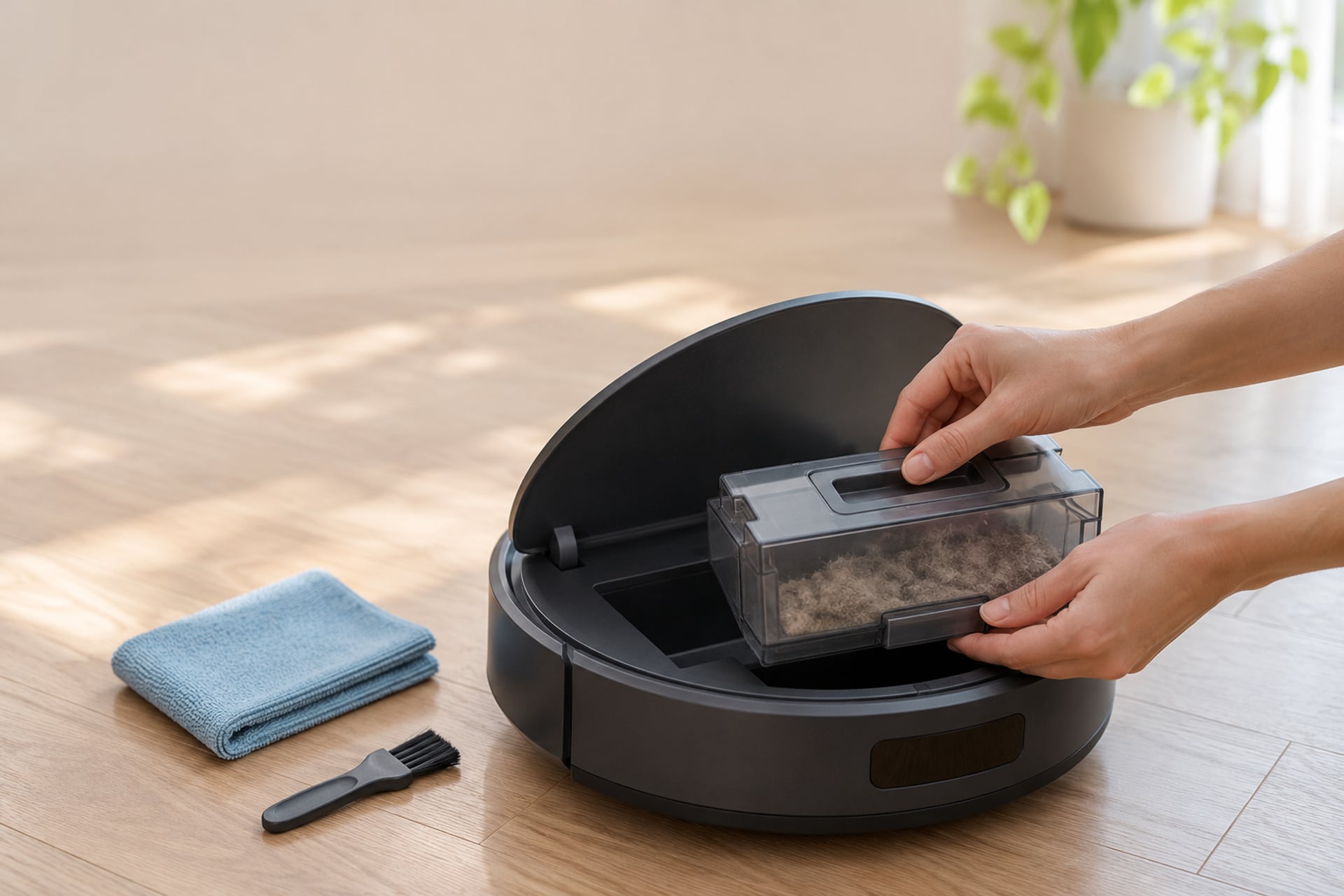
A robot vacuum cleans your floors every day, but it only keeps doing that if you clean it back. The routine is short: empty the bin, clear the brushes, wipe the sensors, rinse or replace the filter, and look after the dock. Skip it and the robot does not break at once. It just picks up less each week, and then it starts to smell, stall or wander.
This guide gives a part-by-part routine for the two robots people ask about most: how to clean a Roomba, and how to clean a Roborock. It also covers mop robots, which add tanks and pads to the list, and a schedule you can follow. Where a maker states a number, we name the maker. Where it does not, we say "check your manual" instead of guessing, because the right interval depends on your model, your pets and your floors.
What You Need
You do not need much. A small pair of scissors or a seam ripper for hair, a dry microfiber cloth for sensors and contacts, a soft brush for the bin, and the maker's cleaning tool if one came in the box. The one purchase worth making early is a set of spare brushes and filters, so a worn part is a five minute swap rather than a week of waiting.
Replacement Kits Worth Keeping in a Drawer
These are the maintenance parts the makers list for the models in this guide. Match the kit to your exact robot before you buy.
-
1Roomba e, i and j series
iRobot Replenishment Kit for Roomba e, i, j series
iRobot lists 3 filters, 3 edge-sweeping brushes and 1 set of dual multi-surface rubber brushes. It is not compatible with the Roomba Combo j7+, Combo j9+ or Combo 10 Max, so check the compatibility list on the listing.
-
2Roomba 105 Combo and Vac
iRobot Replenishment Kit for Roomba 105 Combo and Vac
iRobot lists 3 filters, 3 edge-sweeping brushes and 1 multi-surface bristle brush. It is the kit for the 105 series only.
-
3Roborock main brush
Roborock Rubber Main Brush Replacement
Listed for the Q Revo family, Qrevo S Pro, S7 and Q7 families. The listing describes an anti-tangle floating rubber brush and recommends cleaning it every 2 weeks and replacing it every 6 to 12 months.
-
4Roborock washable filter
Roborock Washable Filter, 2 pack
Listed as washable for the S8 Pro Ultra, S8+, S8 and S7 families. The listing says to remove and rinse it every 2 weeks and to replace it every 6 to 12 months.

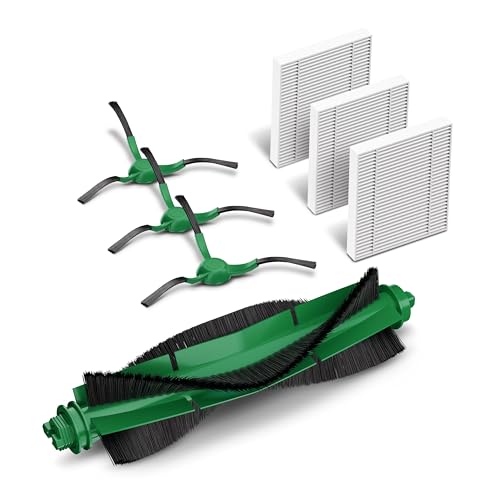


Listing details read on November 6, 2026. Compatibility lists change, so confirm yours on the page before you order.
How to Clean a Roomba
iRobot builds its robots around a bin, a filter, a pair of brushes and an edge brush, and its own listings stress the same point for each: a dirty filter weakens suction, and a worn brush does not grab debris as well. That tells you what to watch. The steps below are a general routine for any Roomba. For the exact interval and the exact way to open each part on your model, follow the iRobot manual or the iRobot support page for your robot, since the pages give a schedule per part and it differs between series.
Your Roomba Routine, Step by Step
-
Switch the robot off and turn it over
Work on a table or a clear patch of floor so loose hair and dust do not end up back on the rug. Have a bin bag or a trash can next to you before you open anything.
-
Empty the bin and tap out the filter
Take out the bin, open it over the trash and let the dust fall. Remove the filter, which iRobot says attaches to the dustbin, and tap it against the inside of the trash can. Do not press down on the filter material.
-
Lift out the brushes and cut away the hair
Remove the main brushes and snip any hair that has wrapped around them. Look at the ends where the brush meets the frame, because hair gathers there and can slow the brush.
-
Wipe the sensors and the charging contacts
Use a dry, clean cloth on the small windows on the underside and the front, and on the metal charging contacts on the robot and on the dock. A film on either one can stop the robot from seeing a drop or from charging.
-
Refit everything and run it
Click the brushes and the filter back into place, slide the bin in until it seats, and start a short cleaning run. If the robot sounds rougher than before, switch it off and recheck the brush ends.
Bin and Filter
The bin is the part you will handle most. A full bin leaves less room for new dust and makes the robot work harder. The filter sits against the bin and catches fine dust. iRobot's kit listings say that a dirty filter weakens your robot's suction power, and one of them states the filter traps 99% of dog and cat dander allergens. That figure is iRobot's own claim for its replacement filter, not a result we measured.
Whether you can rinse a Roomba filter depends on the filter and the model, so read your manual first. If it says to tap and not to wash, do not wash it. When it looks matted, grey all through or bent, replace it instead of cleaning it again.
Brushes and Bearings
Hair is the main maintenance job on a robot vacuum. Even brushes sold as tangle resistant collect some. iRobot says its dual multi-surface rubber brushes do not get tangled with pet hair, but a worn brush "doesn't clean effectively," which is the maker's own wording. Cut away hair as soon as you see it, and look at the ends of the brush for strands that have worked into the housing.
If a brush spins badly even after it is clean, it may be time for a new one. The replacement kits above list new brushes in the box, which is cheaper than waiting until the robot stops picking up.
Edge Brush
The side brush sweeps debris from edges and corners into the cleaning path. iRobot lists its edge-sweeping brushes at an angle for this job, and says worn brushes do not grab debris as effectively. Pull off any hair wrapped around the base, and replace the brush when the bristles splay out or lie flat.
Sensors and Charging Contacts
A robot that keeps stopping, or that does not charge, often has dirty sensors or contacts, not a fault. Wipe the cliff sensors under the front, any camera or lidar window with a dry microfiber cloth, and the metal contacts with a lightly damp cloth that you dry straight after. Do it every time you clear the brushes, since the cost is a few seconds.
Clean Base
If your Roomba empties into a Clean Base, the dock has its own upkeep: a bag you change, a port the dust travels through, and contacts that need wiping. The listings we read for the Roomba replacement kits do not cover the Clean Base, so the bag size and the interval are not stated here. Follow your dock's manual, and look at the self-emptying guide below if you are still choosing a dock. See our self-emptying robot vacuum guide for how the dock types compare.
How to Clean a Roborock
Roborock robots follow the same pattern with a few differences in the details. The company's replacement parts listings, read for this guide, give the clearest numbers of any maker we looked at: a main brush that should be cleaned every 2 weeks and replaced every 6 to 12 months, and a washable filter with the same cleaning and replacement interval. Those are the seller's recommendations for those parts. Your own manual and your own home, particularly one with pets, may call for more often.
Your Roborock Routine, Step by Step
-
Empty the dust bin
Open the lid and tip the dust into the trash. If the robot sits on an emptying dock, the dock does this for you and your job becomes replacing the dock bag when it is full.
-
Remove the filter and rinse it
The filter in the listing is described as washable. Take it out, rinse it, tap it gently to knock off the dirt, and let it dry fully before you refit it. Never put a damp filter back in the bin.
-
Free the main brush
Lift out the main brush, cut away wrapped hair and check both ends. The listing describes the brush as easy to install and remove, so it should come out without tools.
-
Wipe the sensors and contacts
Wipe the lidar window, the cliff sensors under the body and the charging contacts with a dry cloth.
-
Check the mop parts if you have them
Empty the water tank, rinse the pad and let everything dry before you put it back. See the mop section below.
Dust Bin and Filter
Roborock's filter listing says to remove and rinse the filter every 2 weeks, tapping gently to remove dirt, and to replace it every 6 to 12 months. It also says the filter is coated with Teflon for long-lasting filtration when cleaned appropriately, and that presence detection stops the robot from running without a filter. In plain terms: rinse it, dry it all the way, never run the robot without it.
A washable filter is the exception, not the rule. A paper or foam filter usually should not be washed at all, so always check which one you have before you hold it under the tap. Our Roborock replacement parts guide lists the filters and brushes by model.
Main Brush
The Roborock main brush listing says to clean the brush every 2 weeks and replace it every 6 to 12 months to keep suction and performance up. It describes an anti-tangle rubber brush with a floating design that sits against hard floors and lifts on carpet. Anti-tangle does not mean tangle-proof, so a houseful of long hair or a shedding dog may need the brush cut clear more often than that.
Mop and Water Tanks
On a mop model, the water tank and the pad need attention after every mop run. Empty the tank, because water that sits in it grows a smell. Rinse the mop pad and hang it or lay it flat to dry. If your Roborock has a mop that lifts on carpet, make sure it moves freely. A pad stuck in place can drag across a rug.
Dock and Dirty-Water Tank
A dock that washes the mop adds a clean-water tank, a dirty-water tank and a wash tray. Empty the dirty tank and wipe the tray on a regular basis, because that tray is where the grime from the mop ends up. The listings we read for the Roborock brush and filter do not cover the dock, so check the manual for your dock about how often to descale, rinse and replace its parts.
Mop Robot Care
A mop robot is two machines in one body, and the wet half needs its own habits. Most of the smells people complain about come from the same cause: water that was left to sit.
Pads
Rinse the pad after each run and let it dry in the open air. A damp pad folded away or left on the robot is where the musty smell starts. Pads wear out as the fibers flatten and no longer lift dirt, so keep a spare set and rotate them.
Tanks
Empty the clean-water tank when you finish, not just the dirty one. Leave the lid open so the tank dries. Use only what the maker says to put in it, because detergent that the robot is not built for can leave residue in the pump.
Odor
If the robot or its dock smells, treat it as a cleaning job, not a fault. Empty and rinse every tank, wipe the tray and the pad, and let the parts air dry before they go back. If a smell comes back within days, replace the pad.
Maintenance Schedule
Use this as a starting point. Where a maker states an interval, it is shown. Where it does not, the table says to check your manual, and that is the honest answer for most Roomba parts, since the iRobot support pages give a schedule per part.
| Task | Roomba | Roborock | Mop robots |
|---|---|---|---|
| Empty the bin | After most runs, unless it self-empties | After most runs, unless it self-empties | Same as the vacuum bin |
| Filter | Check your manual | Rinse every 2 weeks, per the filter listing; replace in 6 to 12 months | Same as the vacuum filter |
| Main brush | Cut hair away when you see it; check your manual for the interval | Clean every 2 weeks, per the brush listing; replace in 6 to 12 months | Same as the vacuum brush |
| Edge brush | Check your manual; replace when bristles splay | Check your manual; replace when bristles splay | Same as the vacuum brush |
| Sensors and contacts | Check your manual; wipe whenever you clear the brushes | Check your manual; wipe whenever you clear the brushes | Wipe the dock contacts too |
| Tanks and pads | Only on Combo and mop models | Only on mop models | Empty and rinse after every mop run |
| Dock | Check your manual for the Clean Base | Check your manual for the dock | Empty the dirty tank and wipe the tray |
Roomba
Show specifications
- Empty the bin
- After most runs, unless it self-empties
- Filter
- Check your manual
- Main brush
- Cut hair away when you see it; check your manual for the interval
- Edge brush
- Check your manual; replace when bristles splay
- Sensors and contacts
- Check your manual; wipe whenever you clear the brushes
- Tanks and pads
- Only on Combo and mop models
- Dock
- Check your manual for the Clean Base
Roborock
Show specifications
- Empty the bin
- After most runs, unless it self-empties
- Filter
- Rinse every 2 weeks, per the filter listing; replace in 6 to 12 months
- Main brush
- Clean every 2 weeks, per the brush listing; replace in 6 to 12 months
- Edge brush
- Check your manual; replace when bristles splay
- Sensors and contacts
- Check your manual; wipe whenever you clear the brushes
- Tanks and pads
- Only on mop models
- Dock
- Check your manual for the dock
Mop robots
Show specifications
- Empty the bin
- Same as the vacuum bin
- Filter
- Same as the vacuum filter
- Main brush
- Same as the vacuum brush
- Edge brush
- Same as the vacuum brush
- Sensors and contacts
- Wipe the dock contacts too
- Tanks and pads
- Empty and rinse after every mop run
- Dock
- Empty the dirty tank and wipe the tray
When to Replace Instead of Clean
Cleaning fixes dirt. It does not fix wear. A part is ready to be replaced, not cleaned, when one of these is true.
Brushes
The bristles or rubber fins are bent, shortened or cracked, or the brush no longer touches the floor properly. Both makers' listings tie a worn brush to poorer pickup. If you have a Roomba, our Roomba replacement parts guide shows what fits which model. For a Roborock, see the Roborock parts guide.
Filters
A filter that is matted, stained all the way through, or that stays damp, should be replaced. Suction that drops even after a bin and brush clean is usually the filter. Keep a spare, so you can swap one in while the other dries.
Pads and Dock Bags
Mop pads that are flat or frayed, and dock bags that are full, are consumables. They are made to be replaced.
The Robot Itself
If the bin, brushes and filter are all fresh and the robot still cleans poorly, stops often or will not hold a charge, the problem is not dirt. Check the warranty, and see our guide to how robot vacuums work to see which part is likely to be at fault. If the robot is old, our iRobot Roomba reviews are a good place to look at a newer model.
Robot Vacuum Cleaning FAQ
Sources
- iRobot replacement parts listings for the Roomba e, i and j series kit and the Roomba 105 kit, Amazon US, read on November 6, 2026 Source for the kit contents, compatibility, and the statements that a dirty filter weakens suction and a worn brush cleans less effectively.
- Roborock rubber main brush and washable filter listings, Amazon US, read on November 6, 2026 Source for the 2 week cleaning interval and the 6 to 12 month replacement interval for the Roborock brush and filter.
The RobotVacuumer letter
New robot vacuum picks and plain advice on choosing and living with one, about once a month.