Troubleshooting
Roomba Brush Not Spinning
How to tell whether the main brush or the side brush has stopped, the cleaning steps iRobot describes, what the brush error numbers mean, and which replacement part fits which series.
As an Amazon Associate we earn from qualifying purchases, at no cost to you. How we make money.
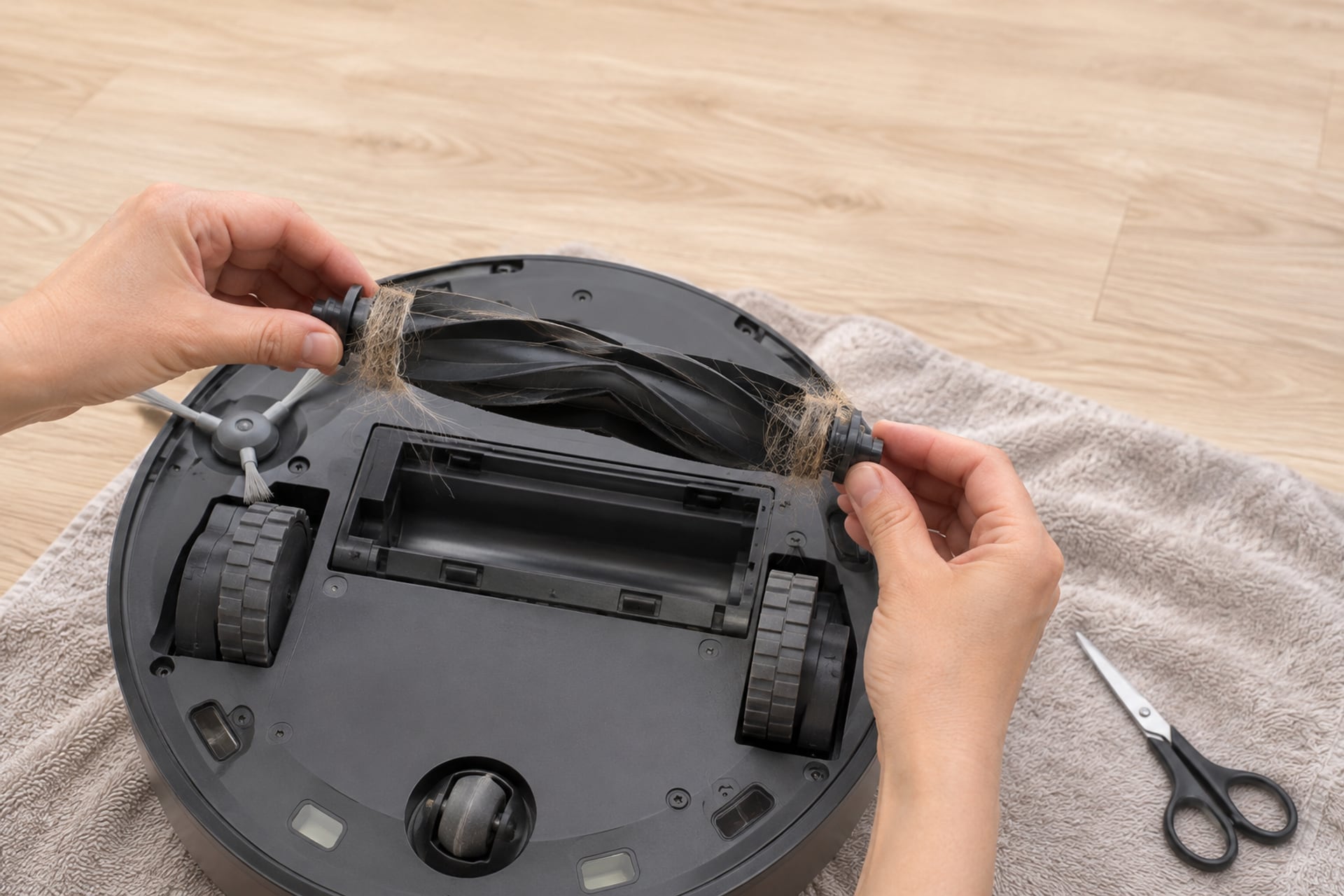
A Roomba has two kinds of brush, and they fail in different ways. The main brush (or the pair of rubber brushes on newer models) is the roller under the middle of the robot. The side brush, which iRobot calls the edge-sweeping brush, is the small spinning arm at the front corner. When one stops, the robot usually keeps running, so the first sign is a dirtier floor, a robot that leaves a line of crumbs along the wall, or a brush that turns by hand but not under power.
This guide starts with telling the two apart, then walks through cleaning, what iRobot says about the guard and the module, the brush error numbers it publishes, and which part fits which series. Every fix below comes from an iRobot support page, listed at the end. Where iRobot does not say something, we say so instead of guessing. If you want the routine version of this job, our how to clean a robot vacuum guide covers regular upkeep. This page is for a brush that has stopped.
Main Brush vs Side Brush: Which Stopped?
Turn the robot over on a clean, flat surface and look at what is actually still. A quick visual check saves you from cleaning the wrong part, and it tells you which iRobot page applies.
The Main Brush
The main brush sits in the cleaning head and does most of the work on carpet. iRobot says excessive hair buildup in the brushes can permanently damage the robot, which is why it asks owners to clean them often. On many models you can spin the brush by hand: it should turn freely. A brush that feels gritty, stiff or locked is almost always blocked by hair at the ends or in the end caps.
The Side Brush
The side brush is the small arm, often with three prongs, that flicks debris from walls and corners into the path of the main brush. It is the part owners ask about most. If it will not spin, iRobot's guidance is simple: do the brush care steps first, and only if it still does not spin after cleaning, the brush module may need replacing.
A Quick Way to Tell
Start a short clean with the robot on a hard floor and watch from a distance. Then check three things: does the side brush rotate, does the main brush rotate, and does the robot throw an error. A side brush that jerks and stops points at hair on its post. A main brush that never turns points at a jam in the cleaning head. A brush that turns on its own when you spin it by hand, but not under power, is the case where iRobot's module guidance matters, covered below.
Clean the Brushes and Bearings
Cleaning fixes the large majority of stopped brushes because hair is the usual cause. iRobot asks owners to clean the main brushes once per week, or twice per week with pets, and to clean the edge-sweeping brush once a week or as needed. If you have missed a few cycles, expect to find a hair mat.
Clean the Main Brush, the iRobot Way
-
Remove the brushes
Use the release tab on the cleaning head to lift the brushes out. iRobot says that on 400 to 900 series models the yellow tabs are on both sides.
-
Clear the ends and check inside
Pull hair and debris from the ends of each brush and check inside the brush body.
-
Remove and clean the end caps
Take off the end caps, which iRobot also calls extractor caps. Clear any hair or debris on, under and around the caps and the metal axles. This is where the bearing sits, so it is the usual place for a stall.
-
Make sure the vacuum path is clear
iRobot lists the vacuum path, called the plenum, as a check in the same procedure. Clear it before you reassemble.
-
Reinstall the caps and brushes
Match the shape of the brush pegs to the shape of the cleaning head module so each brush seats fully.
-
Spin them by hand
iRobot's last step is to spin the extractors and confirm they rotate freely. Brushes that do not rotate freely may need replacement, which is the one sign of wear the page states.
Clean the Side Brush and Its Post
-
Loosen the brush
For the 500 to 900 series, iRobot says to loosen the brush with a small screwdriver. On the Roomba Essential you pull the brush out by hand.
-
Remove the brush
Lift it off the post. Hair often winds under the brush where it meets the post, so look there first.
-
Clear the brush and the post
Remove debris from the brush and from the post of the brush module. iRobot names both parts in its steps.
-
Reinstall the brush
Seat it fully and tighten it. Then run a short clean and watch it turn.
Tools You Need
A small flat-head screwdriver for the side brush screw, the cleaning tool that comes with some older models, and a pair of scissors for hair that has wound tight on an axle. iRobot says the 400 to 500 series and the Roomba Essentials include a cleaning tool you pull over the bristle brush to remove hair. For the rest, your hands and a small brush are enough. Do not pry at plastic gears or at the motor housing.
The Same Hair Problem Elsewhere
If the robot also drives badly or will not charge, hair may be affecting the wheels or the caster too. Our robot vacuum troubleshooting hub sorts those symptoms.
Check the Brush Guard and Module
If a clean brush still does not spin, the problem is no longer hair. iRobot's edge-sweeping brush page says that if the brush does not spin after the brush care procedure, the brush module may need replacing. That is the whole diagnosis iRobot offers, and we do not go beyond it.
What iRobot Says About Replacing the Module
iRobot publishes module replacement steps by series. For the e, i, j and Combo 10 Max robots and the 500 to 900 series, the steps involve removing the brush, loosening the five screws on the bottom cover (the Combo j has four bottom cover screws plus the brush screw), unclipping and removing the battery, then loosening the two screws that hold the brush module. The Roomba s series uses a different path through the cleaning head module and a wire harness connector. If you are not comfortable opening the robot, this is the point to contact iRobot Customer Care instead.
Some Newer Robots Cannot Take a New Module
iRobot says newer versions of the i1, i3, i5 and Combo i5 are non-modular, so the brush module cannot be replaced. To check, look at the eighth character of the serial number: N or Z means non-modular, and any other letter means the module can be replaced. A battery door on the bottom also means the module cannot be replaced, and iRobot says to contact Customer Care. A robot with the original bottom cover, five screws and no battery door can take a new module.
The limited warranty does not cover accessories or consumable items such as the brush itself, according to the same page. A dead brush motor in the module is a different matter, so keep your serial number and proof of purchase ready before you call. iRobot asks for a charged robot with you, the serial number and proof of purchase for warranty claims.
Error Messages About Brushes
We found three brush codes published by iRobot, on its Thailand support page for 2025 and 2026 models. They are not a full chart for every Roomba, so if your robot is older, your app or manual may number things differently.
| Code | What iRobot says it means | What iRobot says to do |
|---|---|---|
| 2 | Main brush stall: the main brush cannot turn | Remove the brush and clear hair and fibers. If it happens on thick carpet, test the robot on a hard floor |
| 1001 | Side brush stall: the side brush cannot turn | Clear debris and hair from the brush, then reboot the robot |
| 1000 | Left side brush stall (Roomba 705C only) | Clear debris and hair, and check that each brush is on the correct side, because left and right are not interchangeable |
What iRobot says it means
Show specifications
- 2
- Main brush stall: the main brush cannot turn
- 1001
- Side brush stall: the side brush cannot turn
- 1000
- Left side brush stall (Roomba 705C only)
What iRobot says to do
Show specifications
- 2
- Remove the brush and clear hair and fibers. If it happens on thick carpet, test the robot on a hard floor
- 1001
- Clear debris and hair from the brush, then reboot the robot
- 1000
- Clear debris and hair, and check that each brush is on the correct side, because left and right are not interchangeable
What the Numbers Do Not Tell You
A stall code says the brush could not turn, not why. In nearly every case the reason is hair or debris, which is why every fix in the table starts with clearing the brush. For other codes, see our troubleshooting hub. iRobot does not say in the pages we read how many times to retry before calling Customer Care, so do not rely on a repeat count.
When to Replace, and Which Part Fits
Cleaning is weekly. Replacing is on a longer clock. iRobot recommends replacing the main brushes every 6 to 12 months, or as needed, and replacing the edge-sweeping brush every 3 months, or as needed. A brush that has been cleaned and still does not rotate freely is a replace-now case under iRobot's own wording.
The part you buy depends on the series. The table below lists what each listing says it fits. Compatibility is the seller's statement on the Amazon listing, which is iRobot's own for these parts. Check the model number on the underside of your robot, and do not buy a part that does not name your series. Our Roomba replacement parts guide covers filters, bins and the rest. If you are not sure of your series, Roomba models explained sorts the names.
| Your robot | Main brush part | Side brush part |
|---|---|---|
| Roomba e, i and j series | Dual Multi-Surface Rubber Brushes, or the replenishment kit that includes a set | Edge-sweeping brush 3-pack, or the same replenishment kit |
| Roomba 105 series | Replenishment kit for 105 Combo and Vac robots (Multi-Surface Bristle Brush) | The same kit, or the 405/205/105/Essential edge-sweeping 3-pack |
| Roomba Plus 400 and 500 Combo | Replenishment kit for Plus 400 and 500 Combo with AutoWash dock (Multi-Surface Rubber Brush) | The same kit, or the 405/205/105/Essential edge-sweeping 3-pack |
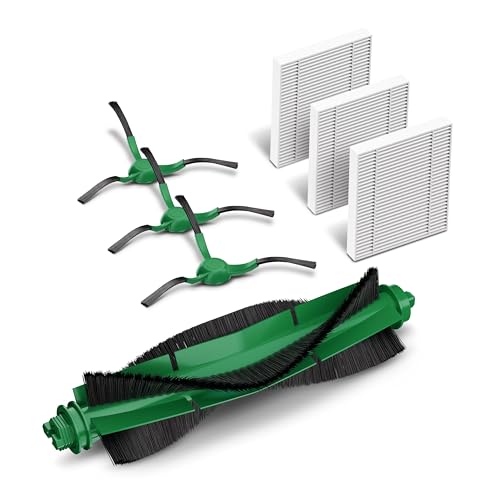
| Roomba 800 and 900 series | AeroForce Extractors, in the 800 and 900 replenishment kit | Two side brushes in the same kit |
Main brush part
Show specifications
- Roomba e, i and j series
- Dual Multi-Surface Rubber Brushes, or the replenishment kit that includes a set
- Roomba 105 series
- Replenishment kit for 105 Combo and Vac robots (Multi-Surface Bristle Brush)
- Roomba Plus 400 and 500 Combo
- Replenishment kit for Plus 400 and 500 Combo with AutoWash dock (Multi-Surface Rubber Brush)
- Roomba 800 and 900 series
- AeroForce Extractors, in the 800 and 900 replenishment kit
Side brush part
Show specifications
- Roomba e, i and j series
- Edge-sweeping brush 3-pack, or the same replenishment kit
- Roomba 105 series
- The same kit, or the 405/205/105/Essential edge-sweeping 3-pack
- Roomba Plus 400 and 500 Combo
- The same kit, or the 405/205/105/Essential edge-sweeping 3-pack
- Roomba 800 and 900 series
- Two side brushes in the same kit
Two compatibility cautions from the listings. The e, i and j kit says it is not compatible with the Roomba Combo j7+, Combo j9+ or Combo 10 Max, so those robots need the separate brushes, which are listed as compatible with the Combo 10 Max. And the Dual Multi-Surface Rubber Brushes are listed as not compatible with the Roomba Combo Essential. If your model is not named on the listing, do not assume it fits.
Main Brushes
Replacement Main Brushes
These are iRobot parts from the maker's own Amazon listings. Match the series before you order.
-
1Roomba e, i and j series main brushes
iRobot Roomba Authentic Replacement Parts, e, i and j Series Dual Multi-Surface Rubber Brushes
One set of dual rubber brushes. The listing says they are made not to tangle with pet hair, and names compatibility with the Roomba Combo and i, e and j series robots and the Combo 10 Max. It says they are not compatible with the Roomba Combo Essential. Best for: an e, i or j owner who only needs the brushes. Not for: a robot that is not named on the listing.
-
2Roomba e, i and j series full kit
A kit of 3 filters, 3 edge-sweeping brushes and 1 set of dual rubber brushes, with a one-year limited warranty listed. The listing says it is not compatible with the Combo j7+, Combo j9+ or Combo 10 Max. Best for: replacing the brushes and the filter in one order. Not for: the three robots it excludes.
-
3Roomba 800 and 900 series kit
iRobot Roomba Authentic Replacement Parts, 800 and 900 Series Replenishment Kit
The listing says it holds 3 AeroForce filters, 2 spinning side brushes and 1 set of AeroForce Extractors. Best for: an 800 or 900 owner who needs both brush types. Not for: any other series.


Kits for the Newer 105 and Plus Robots
Replenishment Kits for 105 and Plus 400 and 500
Each kit pairs a main brush with edge-sweeping brushes and filters, so one order restocks the robot.
-
1Roomba 105 Combo and Vac
iRobot Roomba Authentic Replacement Parts, Replenishment Kit for Roomba 105 Combo and Vac Robots
The listing says it holds 3 filters, 3 edge-sweeping brushes and 1 multi-surface bristle brush. Best for: a 105 owner replacing a worn brush. Not for: other series.
-
2Roomba Plus 400 and 500 Combo with AutoWash dock
The listing says it holds 3 filters, 3 edge-sweeping brushes and 1 multi-surface rubber brush. Best for: a Plus 400 or 500 owner. Not for: other series.

Side Brushes Alone
Edge-Sweeping Brush Packs
If only the side brush died, a 3-pack is the cheaper way to replace it.
-
1Roomba Combo, i, e and j series and Combo 10 Max
Edge-Sweeping Brush 3 Pack for Roomba Combo and Roomba i, e and j Series and Combo 10 Max
A 3-pack of iRobot edge-sweeping brushes. The listing says they install and remove with a coin or similar household item. Best for: an e, i or j robot with a worn or chewed side brush. Not for: the 105, 205 or 405 series.
-
2Roomba 105, 205, 405 and Essential series
Three edge-sweeping brushes. The listing names the Plus 405 Combo with AutoWash dock, the 205 DustCompactor Combo and Vac, the 105 Combo and Vac, and the Essential robots. Best for: those series. Not for: the e, i and j series.


These listings state that non-genuine parts may cut corners on materials and quality control. We list only the parts above because they are iRobot's own and the listings name their compatibility. Match the part to your series before you order.
Roomba Brush Not Spinning FAQ
Sources
- iRobot Customer Care, Main Brush Care: All Roomba Models, homesupport.irobot.com, read on November 20, 2026 Source for the weekly cleaning frequency, the 6 to 12 month main brush replacement interval, the cleaning steps, the cleaning tools and the free-rotation check.
- iRobot Customer Care, Edge Sweeping Brush Care, All Roomba Models, assistance.irobot.fr, read on November 20, 2026 Source for the 3 month edge-sweeping brush interval, the cleaning steps, the left and right brush note, the brush module guidance, the non-modular serial number check and the warranty note.
- iRobot Thailand, Roomba error codes and fixes, irobotthailand.com, read on November 20, 2026 Source for the main brush stall and side brush stall codes. The page covers 2025 and 2026 models.
- iRobot replacement part listings, Amazon US, read on November 20, 2026 Source for part contents and stated compatibility. Figures are the maker's own statements on its product listings.